
Settings: Integrations and publishing
To reach these settings in Kotahi, choose Settings → Configuration.
Semantic Scholar
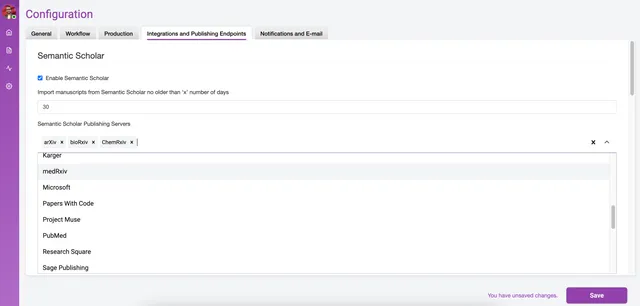
Section titled “Semantic Scholar”A checkbox setting to enable or disable the import of preprints from Semantic Scholar. It sits under Configuration, so only Group Admins and Admins can change it. This feature is only implemented on the prc instance type, because import queries are most commonly associated with a publish, review and curate workflow, and an existing query needs to be in place to use it.
Hypothesis
Section titled “Hypothesis”Settings related to some specific publishing endpoints. This may or may not be relevant to you. Essentially, if you are publishing preprint reviews to some external services the way in is via the hypothesis API.
Crossref
Section titled “Crossref”API information and controls for accessing Crossref.
DataCite
Section titled “DataCite”Kotahi can deposit to DataCite instead of Crossref. Either way the account and the prefix are yours: Kotahi sends the metadata, and the agency registers the DOI.
DataCite needs fewer details than Crossref:
- DataCite username and DataCite password — your DataCite account credentials
- DataCite DOI prefix — the prefix your DOIs are registered under
- Publish to DataCite sandbox — a checkbox for testing against DataCite’s sandbox rather than the live service
- DataCite published article location — the URL recorded for the published article
Crossref additionally asks for journal name and abbreviation, home page, registrant ID, depositor name and email, publication type and a licence URL. DataCite asks for none of those.
Webhook
Section titled “Webhook”This section enables you to set a webhook for publishing to an external endpoint.
Publishing webhook URL - the endpoint or target for the publishing action supplied as a URL
Publishing webhook token - the secret token used to authenticate the exchange
Publishing webhook reference - data sent to the target to know how to process the information
Kotahi API tokens
Section titled “Kotahi API tokens”Input a token to access the unreviewedPreprints API and no other queries.
COAR Notify
Section titled “COAR Notify”Kotahi can receive messages from COAR’s Notify service. A repository tells Kotahi that a manuscript is there and requests a review from a group. The request creates a manuscript on the Manuscripts page, identifiable by the Notify logo in the title text.
COAR Notify auth token — how a repository authenticates with your Kotahi. A Refresh button issues a new one.
Sciety Inbox URL — where Kotahi sends an Announcement: Review when a
manuscript is published, so that the review is picked up by
Sciety. eLife’s production instance posts to
https://inbox-sciety-prod.elifesciences.org/inbox. It is a Sciety-specific
field today; it may be widened to any COAR Notify inbox in future.
Local Contexts
Section titled “Local Contexts”Local Contexts Api Key — credentials for Local Contexts, which supplies Traditional Knowledge and Biocultural Labels for Indigenous communities’ material. It was built for iPlaces and is in use there.
AI Design Studio
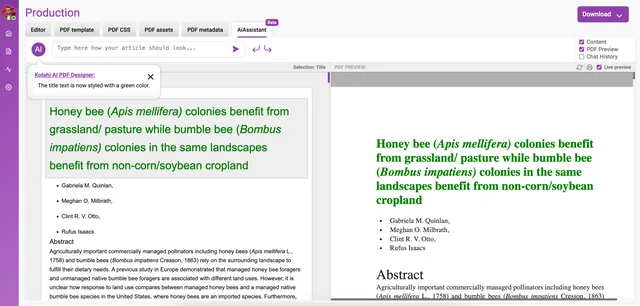
Section titled “AI Design Studio”Utilize the studio to tweak page layouts, adjust image placements, manage widows and orphans, refine content with ease, or come up with completely new designs using the studio.
Select an area (element) on the screen and insert a prompt into the AI chat editor and see the result! Add your OpenAI credentials on the Configuration>Integrations and Publishing Endpoints>OpenAI access key to activate the service.