

Set up task templates
A default task list that every new manuscript inherits.
A task template is the list of steps your group follows on every manuscript — assign an editor, invite reviewers, send the decision. Set it up once and each new manuscript arrives with the list already attached.
Open the builder
Section titled “Open the builder”Choose Tasks in the left menu. This opens the Task Template Builder.
A group with no template yet shows Add your first task… and a green +.
Add a task
Section titled “Add a task”Click +. A row appears with three fields.
Title — what the task is. “Assign handling editor”, “Check citations”, “Publish”.
Assignee — who is expected to do it.
Duration in days — how long the task should take. New rows start at None, meaning no duration is set. Where a duration is set, the task arrives on a manuscript with a due date.
There is no save button. The builder saves as you type.
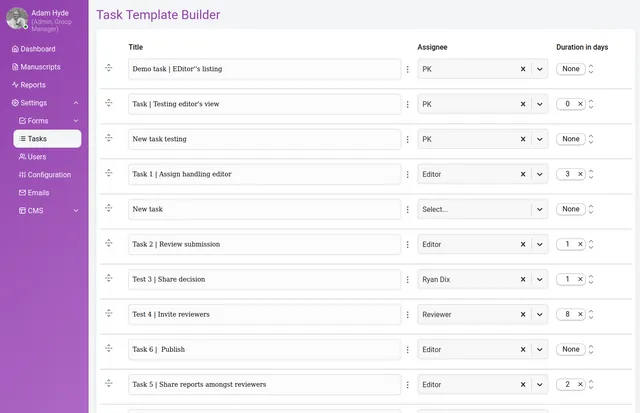
Add as many tasks as you need using the + below the last row. Drag the handle at the left of a row to reorder them — the list runs top to bottom, so the order on this screen is the order of your workflow.
The three-dot menu at the right of a row offers Edit and Delete.
What the template does and does not do
Section titled “What the template does and does not do”The template sets the starting list. When a manuscript is created its tasks are copied from the template, and from that moment the two are independent.
That has a consequence worth knowing before you edit: changing the template does not change manuscripts that already exist. A step you add today appears on everything submitted from today, and on nothing already in progress. If a manuscript in flight needs the new step, add it to that manuscript directly.
It works the other way round too — an individual manuscript’s tasks can be changed without touching the template, so a submission that needs an extra step can have one.
Keep the template to steps that apply to everything you handle. Anything that only applies sometimes is better added to the manuscript that needs it.